Invite-only TradingView indicator

This is the only thing missing from your chart…

Edge Algo displays on your chart: buy/sell signal, entry zone, stop loss, and first, second, and third targets (TP1/TP2/TP3). You don't need to analyze candlesticks or indicators—everything is clearly displayed.

  • Runs natively on TradingView
  • Invite-only access
  • Full walkthrough after purchase
  • Support after activation
BTCUSDT · 1H LONG
TP3 TP2 TP1 ENTRY SL BUY
Entry Stop Loss TP1TP2TP3
Why trust it

A tool that lives inside TradingView — no empty promises

Runs natively on TradingView

Invite-only access after activation

Full usage walkthrough after purchase

Support available after activation

Chart examples

What does a trade actually look like?

Entry zone, stop loss and three clear targets — one buy and one sell scenario, straight from the chart.

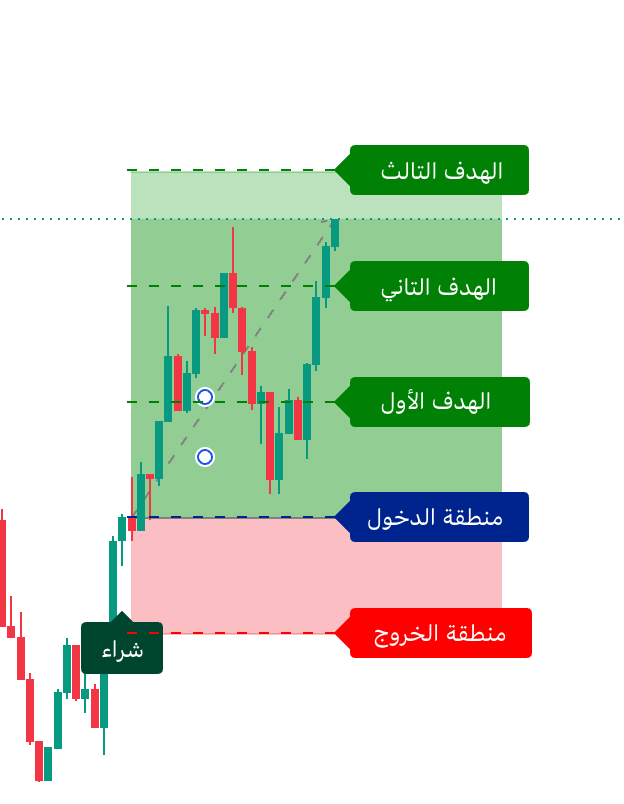
Buy scenario

BUY Buy scenario

A buy signal with the entry zone, stop loss below and the three targets above.

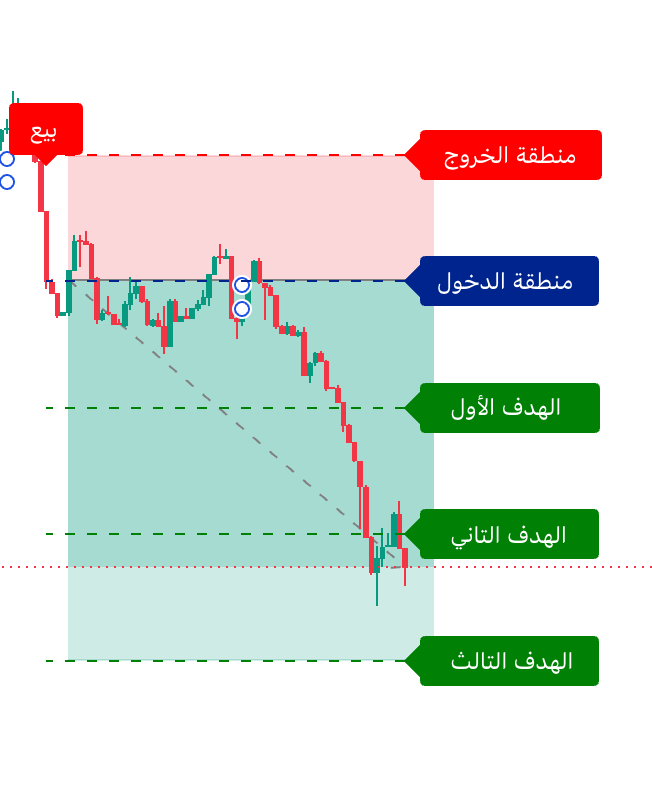
Sell scenario

SELL Sell scenario

A sell signal with the entry zone, stop loss above and the three targets below.

What traders say

Feedback from real users

★★★★★
“What I like most is that entry, stop and targets are all drawn — I no longer calculate anything myself.”

Fahad Saudi Arabia 🇸🇦
★★★★★
“I tried it on several timeframes and my analysis became cleaner and faster.”

Omar UAE 🇦🇪
★★★★★
“Instead of five indicators on my chart, I now have one that gives me what I need.”

Nasser Kuwait 🇰🇼
★★★★★
“Activation was quick and the post-purchase walkthrough was very clear.”

Hamad Qatar 🇶🇦
★★★★★
“The alerts are great — I get the signal on my phone the moment it appears.”

Sultan Oman 🇴🇲
Features

What exactly does it show you?

Every trade gives you the essentials on the same chart — no extra math.

Trade direction: buy or sell

Buy / Sell

Entry price / zone

Entry

Stop loss

Stop Loss

Take-profit 1, 2 and 3

TP1 / TP2 / TP3

Ready-made alerts

Alerts

Supported markets & timeframes

Multi-market
Every trade on the chart
TP3Target 3
TP2Target 2
TP1Target 1
ENTRYEntry
SLStop loss
Why it matters

Each feature — and what it means for you

01 No Repaint

Confirmed signals never change

Once a signal confirms at candle close, it is never modified afterwards.

02 Entry + SL + TP

Every trade level is visible

Entry, stop loss and three targets on one chart — no extra math.

03 Alerts

Alert the moment a signal appears

Enable a TradingView alert and get notified the moment a new signal prints.

04 Multi-market

Works on every market and timeframe

Crypto, forex, indices and stocks — pick the market and timeframe that fit your style.

For the technically curious: internally the indicator uses trend and momentum filters to reduce false signals. That is secondary — what matters is the signal and levels you see on the chart.
Important

What does "No Repaint" mean?

Signals confirm on candle close

Once a buy or sell signal is confirmed at candle close, it is never changed or removed afterwards. What you see on the chart is what actually happened.

Live performance is still affected by market conditions, and historical results do not guarantee similar future results.

Performance

How it performed across markets

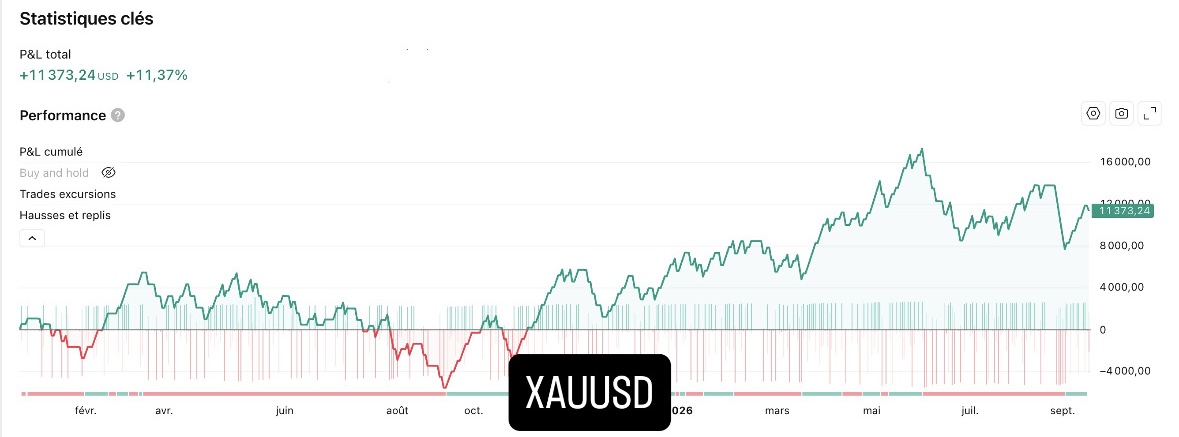
Backtest results from the TradingView Strategy Tester, showing historical performance on past market data.
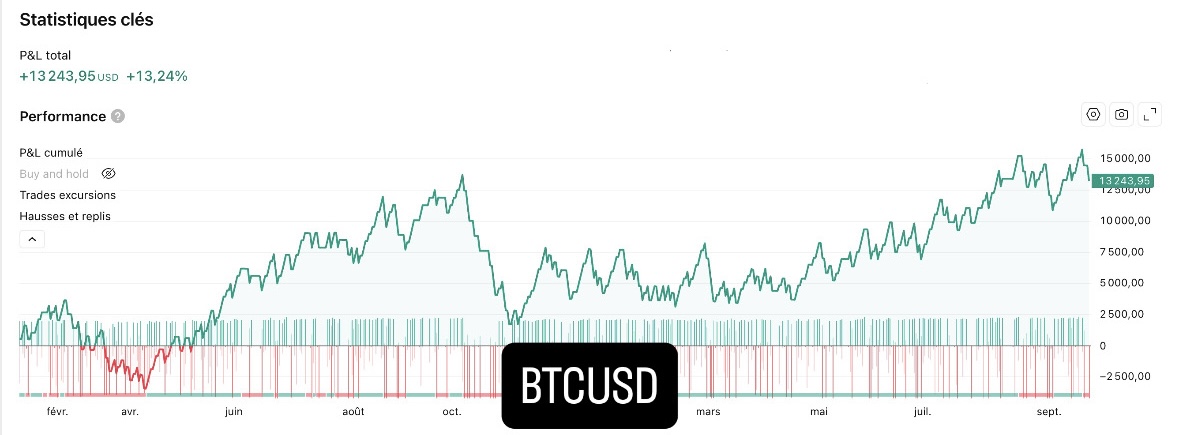
BTCUSDT
BTCUSDT backtest
Last 12 months
XAUUSD
XAUUSD backtest
Last 12 months

Results shown are historical backtests. Achieving similar results requires strict money management, and trading involves risk.

How it works

From payment to activation — 3 steps

01

Pick a plan and pay

Choose monthly, yearly or lifetime and complete a secure checkout.

02

Submit your username

After payment you get a page with a walkthrough video and a field for your TradingView username.

03

We activate your access

We verify payment, add your account to the access list and send you a confirmation with usage guide.

After paying, submit your TradingView username and you will receive a direct invite to the indicator.
Pricing

Choose your plan

Secure checkout with no auto-renewal — we remind you before your access ends.

Monthly

$50 / month $75
No auto-renewal
  • Full indicator access
  • Training videos
  • Ongoing indicator updates
  • Full support from our team
Start monthly

Lifetime

$390 one-time
One payment — permanent access
  • Full indicator access
  • Training videos
  • Ongoing indicator updates
  • Full support from our team
  • All future updates free
  • Priority support
Get lifetime access

Prices in USD. Monthly and yearly plans do not auto-renew — renewal is manual.

FAQ

Frequently asked questions

Is the indicator invite-only?
Yes. It is private and not publicly listed — access is granted only after we add your username manually.
What is my TradingView username?
It is your TradingView account username — we need it to add you to the list of users allowed to use the indicator.
How long does activation take?
After payment and username submission, we activate your access and you receive a direct invite — usually within a few hours.
Does payment auto-renew?
No. Renewal is up to you, and we send a reminder before your access ends.
What does No Repaint mean?
Signals confirm at candle close and never change afterwards. This does not guarantee identical live vs. historical performance.
Does it work on mobile?
Yes — it runs inside TradingView, which has a mobile app.
Which markets does it support?
All markets and timeframes available on TradingView: crypto, forex, indices and stocks.
Do I need a paid TradingView plan?
A free account is enough to add and run the indicator. Some advanced alert features may need a paid plan.
How do I contact support?
Via the support email in the footer — we reply as fast as we can.
Is there a refund?
Yes, within 7 days of purchase per our refund policy.
Do you guarantee profits?
No. It is an analysis tool that helps you decide more clearly — the decision and responsibility are always yours.

Get the clarity your decisions need

The indicator gives you the signal, entry, stop loss and targets — the decision stays yours.

Get access now